Programmes require Train or Train + Fuel. You can preview them before subscribing. Compare memberships.
Choose a programme
Open Discover from Train to view the available programmes. Open one to review its sessions, exercises, level and equipment. Add the programme when you want to follow it.
In Train → Programmes, use the arrows to move between your plans. The active programme is marked Active. Starting another programme asks you to confirm the change; your other programmes remain available.
Start the next session
Use Start session to open the next workout. You can view the other session cards before training, but programme sessions keep their prescribed exercise structure.
Finish and save the session to move the programme forward. An empty workout or one of your own routines does not move a programme to another session.
Skill progression
Some programmes include stages for skills such as pull-ups, holds or ring strength. Choose the appropriate stage in the workout.
Record the required reps or hold time and an RPE for every working set. Meeting the stage’s targets at RPE 8 or below allows the next stage to appear in a later session. Completing a session without meeting those targets keeps the current stage.
Finish a programme
A completed programme shows a green completion marker and Restart programme. Restarting retains your recorded skill progress so you can continue from the stage you reached.
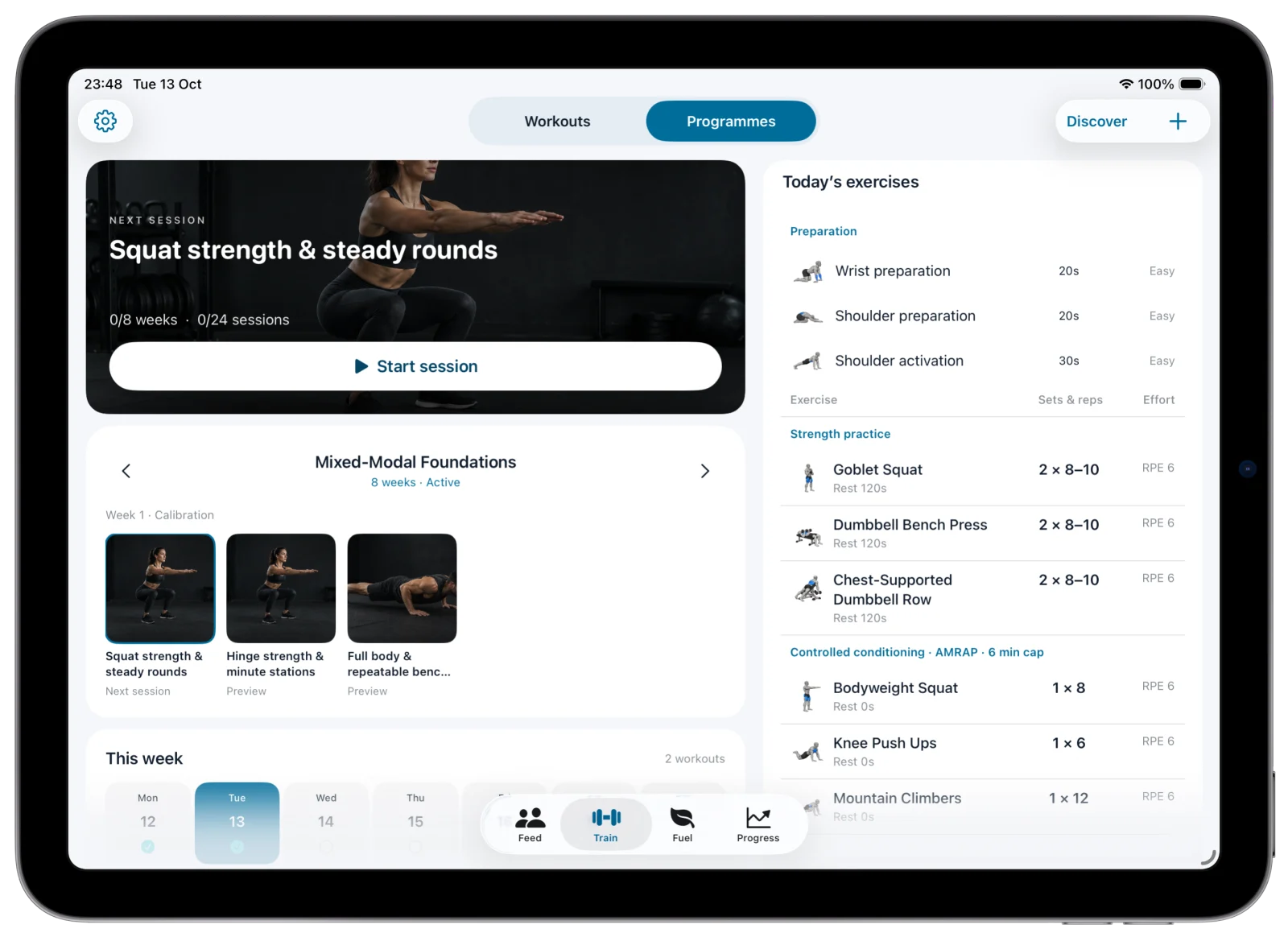
Browse programmes and open the one that fits your training.
View full-size screenshot ↗Need a hand? Contact [email protected].